
Every time you open PDF document using Adobe Acrobat Reader, the document window will open at maximized size. You may feel unnecessarily large windows to be annoying especially with high-resolution screen.
This patch is some solution for this problem, which was posted to fj.sys.mac. :-)
Applying this patch, you can change the size of the window (zoomed window) to your preference.
Theoretically, this patch doesn't affect other features. But it may cause unexpected behavior depending on the window size you specify.Please apply it at your own risk.
The following versions (for PowerPC) are confirmed.
Other versions will be OK as far as it was accepted when dropped onto the ARZoomPatch window.
The software and the documentation are copyrighted by the author. Note that the author IS NOT responsible for any damages caused directly or indirectly by this software.
This patch is unofficial one and hard to guarantee to work appropriately. Since I must discontinue distributing the software when the unexpected behavior was found, I basically can't approve redistribution of the software.
Those are the note of major changes. Some minor fixes may not be listed.
The first release.
Supported versions: Acrobat Reader 4.05aJ, 5.00
Launch ARZoomPatch. The window will be opened.
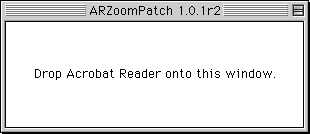
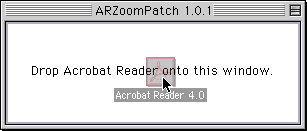
Drop your Acrobat Reader onto the window.
Current window size will be displayed. Change the fields as you like and push Apply.
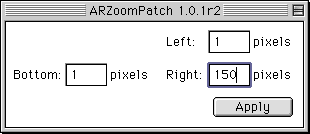
You should specify the window size by entering how many pixels is it smaller than the screen (excluding the menu bar.) The field Top
is available only on Acrobat Reader 5.0.
That's all. So simple, eh? :-)
If the dropped file was rejected, the version of the file may not be compatible with this patch. See Supported Acrobat Readers for confirmation.